
Handling of
NFC-equipped products
JP / EN
Thank you very much for using our product. To ensure safe and comfortable use, please be sure to review the following information before use.Product Overview
This product includes an NFC tag (NTAG215 chip) that enables information reading using Near Field Communication technology. It operates at a communication distance of approximately 1–3 cm and does not require charging. Note that the NFC tag does not emit radio waves on its own.Compatible Devices
While the product can be used with the devices listed below, operation is not guaranteed on all devices or in all environments. Before use, please ensure your device supports NFC functionality.iPhone: iPhone 7 or later (iOS 13 or later recommended). NFC tag reading is possible using the standard reader mode, Shortcuts, or apps such as NFC Tools.Android: Devices equipped with NFC (Android 6.0 or later recommended). Reading is possible using standard functions or apps such as NFC Tools.Dedicated NFC Reader: Can also be used with PC-connected readers and professional/industrial terminals.
Usage Instructions
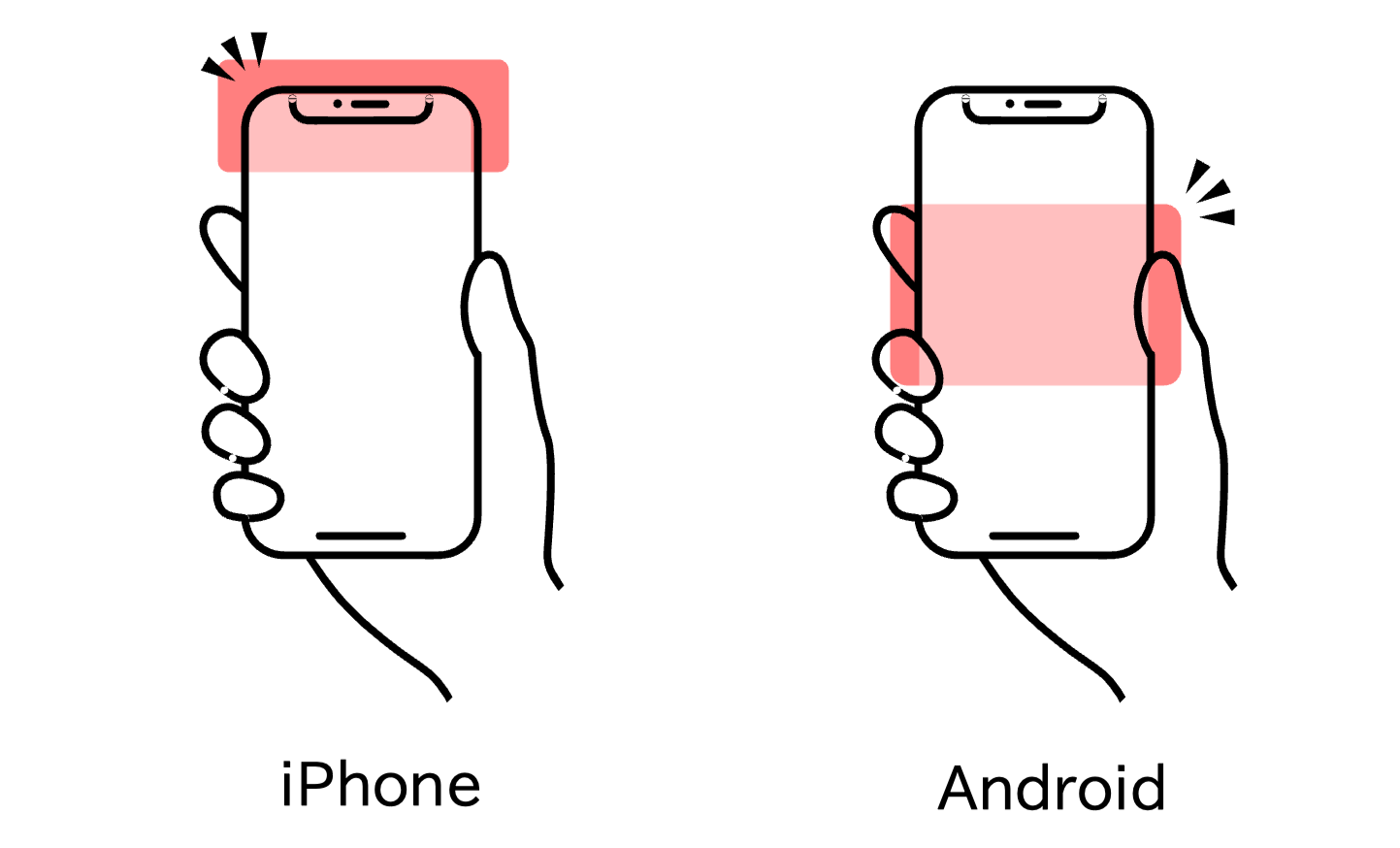
Unlock your smartphone and turn on the NFC function.Bring the device’s NFC antenna close to the tag.iPhone: Touch near the earpiece at the top.Android: Touch the area on the back marked with the FeliCa or NFC symbol.
Note: Devices without NFC functionality cannot use this feature.
Recommended Environment
Please ensure that the NFC function is enabled. Turn NFC on in your device’s settings.We recommend updating your device’s OS to the latest version. Older versions may not function properly.To read the NFC tag, bring the device’s NFC antenna (typically around the center of the back of the device) close to the tag. As the antenna position varies by model, adjust the reading position accordingly.Thick cases or covers may interfere with NFC communication. If reading does not work well, try removing the case.Strong magnetic fields or nearby electronic devices may interfere with communication; use the product as far away from them as possible.Accessing web pages requires an active internet connection.
Troubleshooting When Reading Fails
Turn on the device’s NFC functionRemove the device caseCheck the antenna position and change the angleTry using a different side of the deviceMove away from metal surfaces and other IC/magnetic cardsTry reading with another deviceEnsure the tag hasn’t been locked, erased, or overwritten (e.g., by another app)
Other Notes
Some smartphones and tablets may not come with NFC functionality as a standard feature. Please check your device’s user manual or official website to confirm NFC support.When using corporate or industrial devices, specifications of the system or applications may impose restrictions on reading NFC tags.The method for reading data from NFC tags varies depending on device settings and applications. For details, please refer to the official help resources provided by each device manufacturer or application.
⚠ Cautions for Product Use
⚠ General Product Notes
Physical Handling
Enable the NFC function on your smartphone or reader. Then briefly hold the device over the tag.Do not bend, twist, compress, strike, perforate (make holes), or cut the tag area, as this may cause malfunction. When adding key rings, sewing, or adjusting size, avoid the tag location.Avoid excessive loads (sitting on, stepping on, placing under heavy objects) and abrasion or scratches from sharp objects.Do not disassemble, modify, drill holes, re‑glue, or re‑sew.
Environment and Storage
Avoid high-temperature environments (direct sunlight in cars, saunas, high dryer settings, steam or boiling water) and freezing conditions.Store in a well-ventilated place away from direct sunlight, high temperature and humidity, dust, and grease/oil vapors.Avoid storing near strong magnetic fields, strong RF sources, or in direct contact with metal surfaces.During transport, protect the product by laying it flat or using cushioning to prevent bending, pressure, or impact.
Electromagnetic Environment and Communication
If metal, thick cases/covers, or magnetic sheets are in between, the read range may be shortened or reading may fail.In strong electromagnetic environments (e.g., near industrial equipment, MRI rooms, or radio transmitters), tag reads may be unreliable.In locations where wireless use is restricted or prohibited—such as aircraft cabins, hospitals, schools, or exam venues—follow facility instructions.
Cleaning and Maintenance
Even if the product is water‑resistant or water‑repellent, avoid prolonged immersion and exposure to hot springs, seawater, chlorinated water, sweat, cosmetics, perfumes, hair products, detergents, bleaches, and solvents (lighter fluid, thinner, high‑proof alcohol), as these may cause performance degradation or changes in appearance.Wipe off dirt gently with a soft, dry cloth. For damp wiping, use a well-wrung cloth, and do not press hard on or rub/wash the tag area.Do not use bleach, abrasives, ultrasonic cleaners, steam cleaning, or strong solvents.
Safety Precautions
This product may contain small parts. To prevent accidental ingestion or choking by infants or pets, store out of their reach.If you have concerns about your health or medical devices (e.g., implantable medical devices), consult a physician before use.
⚠ Notes by Product Line
Keychain
If a key bundle or metal parts are constantly pressed firmly against the tag surface, the read range will decrease. Please arrange items so the tag surface does not rub unnecessarily.Avoid strong impacts such as throwing, dropping, or getting caught in a door, as these may cause cracking of the resin or damage to the internal PCB.Do not leave the product for long periods in high-temperature environments such as on a car dashboard.If the product gets wet, promptly wipe off moisture and dry it completely in the shade. Avoid using a hair dryer or other hot-air drying.When replacing or adding a carabiner or ring, avoid the tag location and take care not to pinch the tag between the hardware.Attaching excessively heavy key bundles may deform the product, so please be careful.RF interference from nearby devices (e.g., car smart key fobs) may affect operation.
Apparel
For washing, please use a laundry net, gentle cycle, cold or lukewarm water, short wash, and no bleach. Refrain from vigorous rubbing of the tag area.Tumble drying is not recommended. Dry naturally in the shade or laid flat.Do not iron directly over the tag area, especially at high temperatures. Avoid direct ironing on printed or embroidered areas, as it may cause peeling or thread breakage.Avoid dry cleaning, steam, and ultrasonic cleaning, as these may damage the tag (material care labels and accessory handling symbols take precedence).Color fading or dye transfer may occur due to rain, sweat, or friction. While impact on tag performance is minimal, prompt care is recommended to preserve appearance.Repeated wear and washing may alter the texture; please handle with care.When performing remakes (hemming, embroidery, adding prints) or name personalization, always avoid the tag location. If a sewing needle, heat press, or hot plate contacts the tag, it may cause failure.Do not resew labels or patches or peel off and reglue them (risk of internal antenna breakage).Avoid storing items while soiled (e.g., sweat or cosmetics). Store in a dark place with low humidity to prevent mold, odors, and deterioration.Store folded flat in a clean, dry place.
Jewelry
If the tag’s antenna is close to metal when worn, the read range may decrease. During reading, hold the device briefly over the tag.Perfume, cosmetics, sunscreen, hair spray, abrasives, silver polish, household detergents, and bleaches can damage metal, resin, adhesives, or resin encapsulation. Avoid direct contact and promptly wipe off any that adheres.Remove the item before bathing, using a sauna, hot springs, seawater, pools, or in high-temperature/high-humidity environments. Do not subject the NFC tag area to ultrasonic cleaning, steam, or boiling water.If exposed to seawater or chlorinated water (pool), lightly rinse with fresh water and wipe off moisture with a soft cloth.Store items in individual pouches or jewelry boxes. Prevent rubbing against other metal products or gemstones, and avoid direct sunlight and high temperature/humidity.For maintenance such as size adjustment, stone resetting, or re-plating, always consult a specialist in advance while indicating the tag location. Heat, pressure, or chemical treatments may damage the tag.Limit care to gentle wiping with a soft, dry cloth.If you have a metal allergy, refrain from wearing for extended periods, and discontinue use immediately if you experience any skin discomfort.
Disclaimer
Please note that we cannot be held responsible for any damages arising from the use or inability to use this product, nor for data modification or unauthorized access by third parties.